Trusted by 14,000+ creators worldwide

Animate Kids Drawings with AI

Bring kids' drawings to life with AI animation. Upload your child's artwork and watch it come alive in a magical video.

  • Start from text in seconds
  • AI voiceover
  • Auto-selects visuals
  • Use your own media
Video Format
3,823 people used this tool in the last 24h
Start for free.(no credit card required)

or explore our 42+ other tools to create the exact video you want

Explore our tools

Animate Kids Drawings with AI in 4 Simple Steps

1 Upload Your Child's Drawing

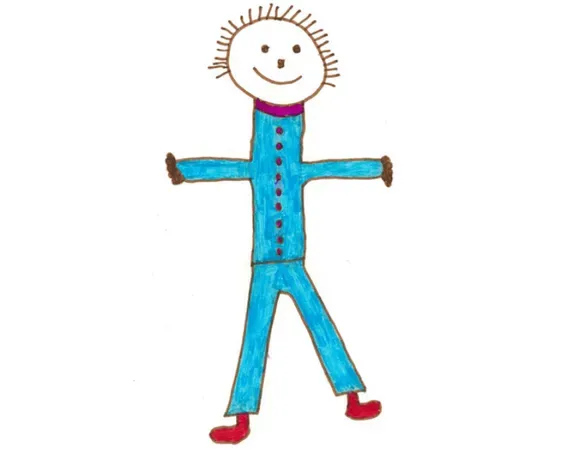
Start by importing at least one clear kids drawing in PNG, JPEG, or WEBP format. The drawing should be easy to see, well lit, and centered so Revid AI can recognize the characters, objects, and details that will become the heart of the animated story.

2 Describe the Story or Adventure

Add a simple prompt describing what should happen in the animation. For example, you can write about a brave little astronaut exploring the stars, a dinosaur going on a friendship adventure, or a magical castle coming to life. If you leave the prompt short or simple, the AI can still build a child-friendly story from the uploaded artwork.

3 Choose the Animation Style

Select the media type you want for your kids drawing animation: moving AI images for a charming animated image style, or AI video for a more dynamic video result. The tool uses your uploaded drawing as the main visual reference, keeping the childlike look and imagination of the original artwork.

4 Generate, Edit, and Share

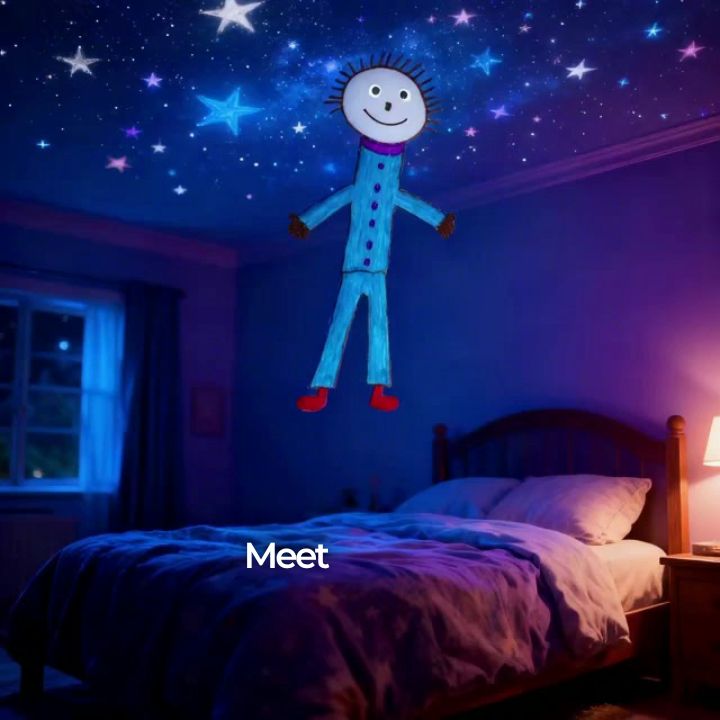
Click generate and Revid AI will animate the kids drawing into a narrated video story with voiceover, music, and magical animated scenes. When the video is ready, you can preview it, make edits in the built-in editor, download it, or share it with family, friends, classmates, or your audience.

01

Bring Your Child's Artwork to Life as a Fully Narrated Animated Story

Upload any child's drawing and Revid transforms it into an animated video story where the drawn characters become the heroes of an age-appropriate adventure. The AI reads the visual content of the drawing, builds a narrative around the characters and objects it contains, and produces a narrated video with voiceover, music, and animated scenes. The original drawing remains the primary visual throughout the video rather than being replaced by generic AI imagery. The result is a personalized keepsake that families keep, share, and revisit far more than a static drawing ever would.

02

How the AI Reads and Animates Children's Drawings

The tool is designed specifically to honor the original artwork. It identifies the characters, objects, and settings in the drawing and builds the video story around what is actually depicted rather than substituting generic AI characters. The generation applies a locked ultra-quality image model to maintain the childlike quality of the original drawings as they animate. The voiceover is warm and engaging, written in a storytelling voice appropriate for ages 3 to 12. You can provide a story direction in the prompt, or let the AI construct a narrative from the drawing alone.

03

A Keepsake Parents and Grandparents Actually Share

Children's artwork has always been something families want to preserve, but drawings fade, get lost, and rarely leave the refrigerator door. An animated video story transforms that drawing into a shareable, permanent piece of content. Parents post these to family group chats, send them as gifts, and create birthday surprises by animating drawings from the recipient's childhood. For related tools that turn children's imagination into animated content, the AI movie maker supports text-based cinematic storytelling that older children can use independently to create their own video stories.

Target Audience

Who is this tool for?

Parents and grandparents

Turn your child's or grandchild's drawings into animated keepsake videos that preserve their artwork and creative imagination in a format your entire family will want to watch and share.

Teachers and classroom educators

Bring student artwork to life as classroom rewards and creative writing projects, turning children's illustrated stories into animated videos that motivate students and showcase their creativity.

Children's content creators

Feature real children's drawings as the visual foundation of your channel content, creating a unique and emotionally resonant format that parents actively seek out and share.

Family gift and memory brands

Offer animated drawing personalization as a premium product or service for birthdays, holidays, and family occasions, using Revid to produce each video without a custom animation workflow.

Comparison

Why Choose Revid for Kids Drawing Animation?

Professionally animating a children's drawing requires a character animator and custom production work for each drawing. Revid automates the entire process from upload to finished narrated video.

Input
Revid Kids Drawing AnimationUpload any child's drawing and generate immediately
Custom Drawing AnimationDrawing must be digitally cleaned, rigged, and prepared by an animator first
Story creation
Revid Kids Drawing AnimationAI writes a complete age-appropriate narrative from the drawing content
Custom Drawing AnimationScript must be written separately and delivered to the animation team
Voiceover
Revid Kids Drawing AnimationAI narration in a warm storytelling voice generated automatically
Custom Drawing AnimationRequires recording or hiring a professional narrator for each video
Drawing preservation
Revid Kids Drawing AnimationOriginal artwork remains the primary visual element throughout the video
Custom Drawing AnimationAnimators often redraw characters in a different style, losing the original look
Production time
Revid Kids Drawing AnimationAnimated story video ready in minutes after uploading the drawing
Custom Drawing AnimationCustom animation projects typically take days to weeks per video
Cost
Revid Kids Drawing AnimationAffordable credit-based pricing with no minimum project size
Custom Drawing AnimationCustom animation is priced per project and requires a minimum scope
FAQs

Frequently Asked Questions

What is the Animate Kids Drawing tool?
Revid AI's Animate Kids Drawing tool is an AI kids drawing animation generator that turns children's artwork into a narrated animated video. You upload a child's drawing, describe the story you want to tell, and the AI creates a magical video where the characters and objects from the drawing come to life. It is designed for parents, grandparents, teachers, and creators who want to animate kids drawing artwork without learning animation software.
How does AI kids drawing animation work?
The tool analyzes the uploaded children's drawing, identifies the main characters, objects, and visual elements, then builds an age-appropriate story around them. Instead of replacing the artwork with generic visuals, Revid uses the original drawing as the primary visual foundation. The AI then creates a short animated video with narration, music, and scenes that make the kids drawing feel alive.
How do I animate my child's drawing with Revid AI?
To animate your child's drawing, upload a clear image of the artwork, write a prompt describing the adventure or story, choose whether you want moving AI images or AI video, and click generate. In a few minutes, Revid AI creates an animated kids drawing video with a warm voiceover and a child-friendly storyline. You can then edit, download, or share the final video.
What kinds of drawings can I upload?
You can upload most children's drawings, including drawings of people, animals, monsters, superheroes, rockets, castles, cars, rainbows, fantasy worlds, and imaginary characters. For best results, use a clear photo or scan where the drawing is visible and not too dark or blurry. The AI works best when the kids drawing has recognizable characters or objects that can become part of the animation story.
Can I upload more than one kids drawing?
Yes. You can import one or multiple kids drawings. If you upload several drawings, Revid AI can combine them into one cohesive animated story. For example, one drawing might become the hero, another might become the magical place they visit, and another might become a friend or object in the adventure.
Will the AI preserve the original child's artwork?
Yes. The Animate Kids Drawing tool is designed to keep the original artwork at the center of the video. The AI uses the uploaded drawing as the main visual reference and tries to preserve the childlike style, colors, shapes, and innocent charm of the original drawing. The goal is not to replace the child's art, but to bring the child's drawing to life in a magical animated video.
Do I need to write a full script?
No. You do not need to write a full script to animate kids drawing artwork with Revid. You can simply describe the idea in one sentence, such as "a little dragon learns to fly" or "the robot goes on an adventure in space." The AI will turn your prompt and uploaded drawing into a complete story with a beginning, middle, and happy ending.
Can the tool create a story if I do not know what to write?
Yes. If you are not sure what story to write, you can keep the prompt very simple or describe only the mood you want, such as magical, funny, adventurous, or bedtime story. Revid AI can use the drawing itself to create a creative, age-appropriate kids drawing animation based on what appears in the artwork.
Is the animated story safe and appropriate for children?
Yes. The tool is built to create child-friendly animated stories suitable for kids roughly ages 3 to 12. The AI focuses on positive themes such as friendship, bravery, kindness, creativity, discovery, imagination, and learning. It avoids scary, violent, or inappropriate storylines so the final kids drawing animation feels uplifting and family-friendly.
What is the difference between Moving AI Images and AI Video?
Moving AI Images creates a charming animated image style where the uploaded kids drawing is brought to life with motion and storytelling. AI Video creates a more dynamic video-style result with stronger motion and scene animation. Both options are designed to animate kids drawing artwork while keeping the original drawing as the main visual inspiration.
Can I use this tool for classroom projects?
Yes. Teachers can use the Animate Kids Drawing tool for classroom storytelling, creative writing lessons, art projects, student rewards, and end-of-year showcases. Students can draw characters or scenes, then the teacher can turn those drawings into animated videos. It is a fun way to connect art, writing, literacy, and digital creativity.
Can parents and grandparents use it to create keepsake videos?
Absolutely. Many families want to preserve children's artwork, but paper drawings can fade, get lost, or sit on the fridge for a few weeks. Revid AI helps turn kids drawings into animated keepsake videos that are easy to save, send, and share. Parents and grandparents can use the videos for birthdays, holidays, family memories, or simply to celebrate a child's imagination.
Can I add narration to the animated kids drawing video?
Yes. Revid AI automatically generates a warm storytelling voiceover for the kids drawing animation. The narration is written in simple, clear language for children and helps turn the drawing into a complete animated story. You can use the generated voiceover as part of the final video and edit the result after generation if needed.
Can I add music and sound to the animation?
Yes. The tool can include background music to make the animated drawing feel more magical and engaging. The generated story may also include sound-effect-style moments such as whooshes, sparkles, gentle magical sounds, or adventure cues, depending on the story direction.
What image formats are supported?
You can upload kids drawings as PNG, JPEG, or WEBP files. For the best AI kids drawing animation result, use a high-quality photo or scan. Make sure the drawing is not cropped too tightly, the page is not covered by shadows, and the artwork is clearly visible.
How can I get the best result when I animate a kids drawing?
Use a clear, bright image of the drawing and give the AI a simple story direction. Mention the main character, what adventure they should go on, and the feeling you want the video to have. For example: "This little astronaut travels to a friendly moon and learns that courage means trying new things." Clear artwork plus a specific prompt usually produces the best animated kids drawing video.
How long does it take to turn a child's drawing into an animated video?
Most kids drawing animation videos are generated in just a few minutes. The exact time can vary depending on the selected media type, video length, and current processing demand. Once the video is ready, you can preview it inside Revid and make edits before downloading or sharing.
Can I edit the video after it is generated?
Yes. After Revid AI generates the animated kids drawing video, you can open it in the built-in editor to make adjustments. You may refine the timing, captions, visuals, audio, or other elements before exporting the final version. This gives you a simple way to polish the video while still letting AI handle the main animation workflow.
Can I share the animated drawing video on social media?
Yes. You can download the final video and share it on platforms like TikTok, Instagram Reels, YouTube Shorts, Facebook, or in private family chats. The tool is especially useful for creating emotional, family-friendly content because people love seeing children's drawings come to life.
Can children's content creators use this tool?
Yes. Children's content creators can use Revid AI to create unique videos based on real kids drawings, fan-submitted artwork, classroom art, or themed drawing challenges. Because the original artwork becomes the core visual, animated kids drawing videos can feel more personal and memorable than generic AI animation.
Can I use the generated kids drawing animation commercially?
You can use videos created with Revid according to your plan and Revid's terms of service. If you upload a child's drawing, make sure you have permission to use that artwork, especially for public or commercial content. For family keepsakes, classroom use, and personal sharing, the tool is designed to be simple and accessible.
How much does it cost to animate kids drawing artwork?
Revid uses a credit-based system. The number of credits required can depend on the generation settings, media type, and length of the video. Before generating, you can review the relevant settings and use your available plan credits. Free accounts may include limited credits, while paid plans provide more monthly credits for creating more animated videos.
Why use Revid instead of hiring an animator?
Hiring an animator to animate a child's drawing can take days or weeks and often requires scripting, voiceover, character preparation, and manual animation. Revid AI automates the process so you can upload a kids drawing and generate a narrated animated story in minutes. It is a faster and more affordable way to bring children's artwork to life while keeping the original drawing visible and meaningful.
What if I have another question about animating kids drawings?
If you need help using the Animate Kids Drawing tool or have questions about creating an AI kids drawing animation, you can contact the Revid support team at hello@revid.ai. We will be happy to help you turn children's artwork into a magical animated video.
View Complete Help Center

Find detailed answers to 100+ questions about features, tools, and workflows

or check our markdown version optimized for LLMs

Tools

Free AI Video Tools

Choose your tool, add your content, and create a video in seconds. Then customize it to your liking.

AI TikTok Video Generator

Turn text into trendy, viral TikTok videos in a snap

Try it out

Prompt to Video

Turn your prompts into engaging videos with AI assistance

Try it out

Add Caption to Video

Generate subtitles in 100+ languages with AI captions

Try it out

PDF to Brainrot

Convert PDFs into attention-grabbing, scrollable videos

Try it out

Text to Brainrot

Turn your text into trendy, scrollable content with dynamic visuals

Try it out

AI Talking Avatar

Create lifelike talking avatars from text in seconds

Try it out

Video Podcast Generator

Transform your podcasts into visually engaging video content

Try it out

AI Movie Maker

Create studio-quality videos from text, no filming required

Try it out

Audio to Video

Make engaging videos from your podcasts, interviews, or any audio content

Try it out

Animated Lyrics Video Generator

Turn any song into an animated lyric video with synced text and visuals.

Try it out

AI Music Video Generator

Transform your music into cinematic music videos.

Try it out

AI Lyrics Video Generator

Transform your lyrics into a complete music video with AI

Try it out
See all tools
How it works

Four simple steps to create and share your video

1
Step 1

Find your next viral idea

Lacking inspiration? Our AI spots trends and helps you adapt them for your own videos, hassle-free.

  • Identify the best performing formats
  • Get inspired by top creators
  • Turn your ideas into captivating videos
Find your next viral idea
2
Step 2

Storytelling designed to captivate

Revid.ai analyzes viral videos and uses those same codes to write your scripts.

  • Write your script or just give the topic to our AI
  • The AI will suggest relevant content to inspire you
  • Paste a link, our AI analyzes it and turns it into a video
Storytelling designed to captivate
3
Step 3

Videos you will love

Create professional videos, share them with one click, and grow your audience.

  • Watch your texts turn into professional videos
  • Automate video creation from your content
Videos you will love
4
Step 4

Publish on TikTok, YouTube, Instagram and more

Reach a wider audience by sharing your videos across all your networks.

Publish on TikTok, YouTube, Instagram and more
revid.ai logo

The fastest way to create captivating videos.