Trusted by 14,000+ creators worldwide

AI Video Selfie Maker

Create viral-style selfie videos without filming. Our AI Video Selfie Maker transforms your ideas into hilarious, Gen-Z style selfie videos with the authentic snapchat aesthetic. Perfect for creating shareable content that looks like real selfies.

  • Start from text in seconds
  • Auto-selects visuals
  • Captions and sound-ready

Create Viral AI Selfie Videos in 4 Simple Steps

1 Enter Your Selfie Video Idea

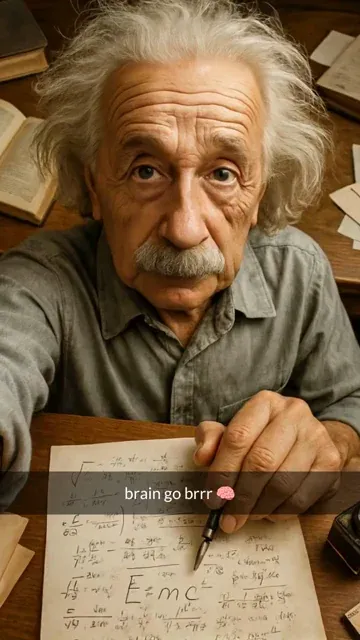
Start by typing a short prompt into the AI Video Selfie Maker. Describe the character, celebrity-style scenario, historical figure, fictional situation, or funny idea you want to turn into a selfie-style video. For example, you can prompt something like "if Albert Einstein was a Snapchat user" and Revid AI will transform it into a viral-ready AI selfie video concept.

2 Choose Your AI Media Style

Pick the media type you want for your AI selfie video. You can generate moving AI images for a classic animated selfie look, or use AI video generation for more dynamic results if your plan supports it. The AI Video Selfie Maker automatically formats your video in a vertical 9:16 layout, perfect for Snapchat, TikTok, Instagram Reels, and YouTube Shorts.

3 Let AI Create the Snapchat-Style Scenes

Revid AI generates first-person front-camera selfie scenes with an authentic low-quality, handheld, 2015 Snapchat-style aesthetic. Each scene is built around your prompt and includes funny lowercase Gen-Z captions, emojis, and meme-friendly on-screen text. No filming, no camera setup, no voiceover, and no acting are required.

4 Edit, Download, and Share

Once your AI video selfie is generated, use Revid AI's built-in editor to refine captions, adjust visuals, add sound effects, change music, or polish the final video. Download your finished AI selfie video and share it on Snapchat, TikTok, Instagram Reels, YouTube Shorts, or anywhere you post short-form viral content.

01

Create Selfie-Style Videos Without Filming

Skip the awkward filming sessions and camera setups. Our AI Video Selfie Maker generates authentic-looking selfie videos from simple text prompts. Whether you want to imagine historical figures as Snapchat users or create hilarious modern scenarios, the AI handles everything—from the first-person perspective to the authentic low-quality aesthetic that makes selfie videos feel real and relatable.

02

Viral-Ready Content with Gen-Z Appeal

Every video comes with automatically generated Gen-Z style captions in lowercase, complete with emojis and that perfect amount of casual humor. The AI understands the snapchat aesthetic from 2015—slightly grainy, hand-held front camera vibes—that makes content feel authentic and shareable. Perfect for social media creators who want to produce viral selfie-style content at scale without appearing on camera themselves.

Comparison

AI Video Selfie Maker Comparison

See why creators choose Revid's AI Video Selfie Maker over traditional selfie video methods

Content Creation
Revid AI Video Selfie MakerGenerate unlimited scenarios from text prompts
Traditional Selfie VideosLimited to what you can physically film yourself doing
Time Investment
Revid AI Video Selfie MakerCreate videos in minutes, no filming required
Traditional Selfie VideosHours of filming, retakes, and setup needed
Creative Freedom
Revid AI Video Selfie MakerAny character, any location, any scenario imaginable
Traditional Selfie VideosRestricted to your appearance and accessible locations
Consistency
Revid AI Video Selfie MakerAuthentic snapchat aesthetic applied automatically
Traditional Selfie VideosInconsistent quality depending on lighting and conditions
Privacy
Revid AI Video Selfie MakerStay anonymous while creating selfie-style content
Traditional Selfie VideosMust appear on camera yourself
Caption Generation
Revid AI Video Selfie MakerAI-generated Gen-Z style captions with perfect tone
Traditional Selfie VideosManual caption writing that may miss the mark
FAQs

Frequently Asked Questions

What is the AI Video Selfie Maker?
The AI Video Selfie Maker is a prompt-to-video tool that creates funny selfie-style videos from text. Instead of filming yourself, you describe a scenario and Revid AI generates a vertical first-person selfie video with a nostalgic Snapchat-style look, Gen-Z captions, emojis, music, and shareable short-form video formatting.
How does the AI Video Selfie Maker work?
The AI Video Selfie Maker turns your written prompt into a series of selfie-style video scenes. The AI creates visuals that look like front-camera selfies, adds funny on-screen captions, applies a low-quality Snapchat-inspired aesthetic, and formats the video for social media. You simply enter an idea, choose your media type, generate the video, and edit or download the result.
What kind of prompts work best for an AI selfie video?
The best prompts for the AI Video Selfie Maker are short, specific, and funny. Try describing a person, character, historical figure, meme situation, or unexpected location. Examples include "if Cleopatra had Snapchat," "an alien taking a selfie at the pyramids," or "a medieval knight posting a casual selfie before battle." The more visual and humorous your prompt is, the better the AI selfie video will be.
Can I create Snapchat-style videos without using a camera?
Yes. The AI Video Selfie Maker is designed to create Snapchat-style selfie videos without filming anything yourself. You do not need a camera, microphone, lighting setup, or acting skills. Revid AI generates the selfie-style visuals and captions from your text prompt, so you can create viral-looking content while staying completely off camera.
Is this a Snapchat selfie video generator?
Yes, Revid AI works as an AI Snapchat selfie video generator for creating videos with a front-camera, low-quality, casual selfie aesthetic. The videos are inspired by the classic Snapchat-style look: handheld framing, funny captions, lowercase text, and a spontaneous social media feel. You can use the results for Snapchat, TikTok, Instagram Reels, YouTube Shorts, and other short video platforms.
Does the AI Video Selfie Maker add captions automatically?
Yes. Every video created with the AI Video Selfie Maker includes automatically generated on-screen text. The captions are written in a casual Gen-Z style, usually lowercase, with a funny and relatable tone. The goal is to make every AI selfie video feel like a real social media post that is ready to share.
Does this tool generate voice or dialogue?
No. This AI Video Selfie Maker focuses on visual selfie scenes and on-screen captions rather than spoken dialogue. The videos are built to feel like Snapchat-style posts or meme-style selfie clips, where the humor comes from the visual scenario, the caption, the music, and the overall social media aesthetic.
What video format does the AI Video Selfie Maker create?
The AI Video Selfie Maker creates vertical 9:16 videos, which is the best format for Snapchat, TikTok, Instagram Reels, and YouTube Shorts. This mobile-first format helps your AI selfie videos look native on short-form video platforms and makes them easier to post without extra resizing.
Can I use the AI Video Selfie Maker for TikTok and Instagram Reels?
Absolutely. Although the AI Video Selfie Maker creates a Snapchat-style aesthetic, the videos are ideal for TikTok, Instagram Reels, YouTube Shorts, Facebook Reels, and other vertical video platforms. The funny selfie format, quick visual storytelling, and Gen-Z captions are designed for short-form social media engagement.
What is the difference between moving AI images and AI video?
Moving AI images use AI-generated images with motion effects to create an animated selfie-style video. AI video generates more dynamic video clips from your prompt when available on your subscription plan. Both options can be used inside the AI Video Selfie Maker to create funny, vertical, selfie-style content from text.
Can I edit the AI selfie video after it is generated?
Yes. After the AI Video Selfie Maker generates your video, you can edit it inside Revid AI. You can adjust captions, refine scenes, change music, add or modify sound effects, and make final edits before downloading. This gives you control over the final AI selfie video while still saving the time of filming and editing from scratch.
Can I create viral meme videos with this AI selfie video generator?
Yes. The AI Video Selfie Maker is perfect for creating meme-style videos, parody selfie videos, historical figure selfies, fictional character selfies, and absurd viral scenarios. Because the tool combines AI-generated visuals with funny Gen-Z captions and vertical formatting, it is especially useful for creators who want fast, shareable meme content.
Do I need video editing experience to use the AI Video Selfie Maker?
No. The AI Video Selfie Maker is built for simplicity. You only need to type a prompt and choose a media style. Revid AI handles the selfie-style visuals, captions, music, sound effects, formatting, and video generation. You can still use the editor for additional polish, but no advanced editing skills are required.
Can I use AI selfie videos for commercial or social media content?
Yes, you can use videos created with the AI Video Selfie Maker for social media posts, brand content, meme pages, creator accounts, marketing campaigns, and other commercial or personal projects, as long as your content follows Revid AI's terms and you have the rights to any custom assets you upload.
How long does it take to generate an AI selfie video?
Most AI selfie videos are generated in a few minutes, depending on the media type, complexity of the prompt, and current processing demand. The AI Video Selfie Maker is designed to help creators move quickly from idea to finished vertical video without filming, retakes, or manual editing.
How can I get better results from the AI Video Selfie Maker?
For better results, use prompts that clearly describe the character, location, and joke. Include details like "front camera selfie," "posing in front of," or a specific funny situation. The AI Video Selfie Maker works best when the idea is visual, simple, and meme-friendly. Short prompts with a strong concept usually create the most shareable AI selfie videos.
View Complete Help Center

Find detailed answers to 100+ questions about features, tools, and workflows

or check our markdown version optimized for LLMs

Tools

Free AI Video Tools

Choose your tool, add your content, and create a video in seconds. Then customize it to your liking.

AI TikTok Video Generator

Turn text into trendy, viral TikTok videos in a snap

Try it out

Prompt to Video

Turn your prompts into engaging videos with AI assistance

Try it out

Add Caption to Video

Generate subtitles in 100+ languages with AI captions

Try it out

PDF to Brainrot

Convert PDFs into attention-grabbing, scrollable videos

Try it out

Text to Brainrot

Turn your text into trendy, scrollable content with dynamic visuals

Try it out

AI Talking Avatar

Create lifelike talking avatars from text in seconds

Try it out

Video Podcast Generator

Transform your podcasts into visually engaging video content

Try it out

AI Movie Maker

Create studio-quality videos from text, no filming required

Try it out

Audio to Video

Make engaging videos from your podcasts, interviews, or any audio content

Try it out

Animated Lyrics Video Generator

Turn any song into an animated lyric video with synced text and visuals.

Try it out

AI Music Video Generator

Transform your music into cinematic music videos.

Try it out

AI Lyrics Video Generator

Transform your lyrics into a complete music video with AI

Try it out
See all tools
How it works

Four simple steps to create and share your video

1
Step 1

Find your next viral idea

Lacking inspiration? Our AI spots trends and helps you adapt them for your own videos, hassle-free.

  • Identify the best performing formats
  • Get inspired by top creators
  • Turn your ideas into captivating videos
Find your next viral idea
2
Step 2

Storytelling designed to captivate

Revid.ai analyzes viral videos and uses those same codes to write your scripts.

  • Write your script or just give the topic to our AI
  • The AI will suggest relevant content to inspire you
  • Paste a link, our AI analyzes it and turns it into a video
Storytelling designed to captivate
3
Step 3

Videos you will love

Create professional videos, share them with one click, and grow your audience.

  • Watch your texts turn into professional videos
  • Automate video creation from your content
Videos you will love
4
Step 4

Publish on TikTok, YouTube, Instagram and more

Reach a wider audience by sharing your videos across all your networks.

Publish on TikTok, YouTube, Instagram and more
revid.ai logo

The fastest way to create captivating videos.