Trusted by 14,000+ creators worldwide

Cartoon Video AI Generator

Create Cartoon AI Videos in Minutes. No filming needed. Natural voices, dynamic visuals for any topic. Ultimate faceless video tool for creators. Try for free!

  • Start from text in seconds
  • AI voiceover
  • Auto-selects visuals
  • Captions and sound-ready
Video Format
3,730 people used this tool in the last 24h
Start for free.(no credit card required)

or explore our 42+ other tools to create the exact video you want

Explore our tools

Create an AI Cartoon Video in 4 Simple Steps

1 Describe Your Cartoon Video

Start by entering a prompt, script, story idea, or article URL. Describe the characters, setting, mood, visual style, and key moments you want in your AI cartoon video. The more specific your prompt is, the better the AI cartoon video generator can match your creative vision.

2 Choose Your Cartoon Media Style

Select the type of visuals you want Revid to generate, including AI video, moving AI images, motion graphics, stock videos, your own uploaded media, or static gameplay-style backgrounds. You can create cartoon scenes, animated storytelling videos, explainers, faceless shorts, or character-driven social videos.

3 Add Voice, Captions, Music, and Sound Effects

Pick a natural AI voice, choose background music, and let Revid generate captions and sound effects automatically. The AI cartoon video generator can create a complete short video with narration, animated visuals, scene pacing, subtitles, and audio designed for TikTok, YouTube Shorts, and Instagram Reels.

4 Generate, Edit, and Publish

Click generate and Revid will turn your idea into a finished AI cartoon video in minutes. After generation, use the built-in editor to adjust captions, replace scenes, refine timing, change music, or polish the final video before downloading and posting it anywhere.

01

AI Cartoon Video Generator That Actually Looks Good

Most cartoon video tools produce results that look obviously AI-generated in the worst way. Revid's AI cartoon video generator is built around visual quality first, producing cartoon-style videos with consistent character design, smooth motion, and cinematic framing that holds up on any screen. Generate your first cartoon video for free with no account required and see the difference quality AI makes to the final output.

02

AI Cartoon Video, From Text Prompt to Animated Scene

Revid's AI cartoon video tool transforms any text description into a fully animated cartoon scene complete with voiceover, background music, and captions. Describe your characters, setting, and story, and the AI generates a cartoon video that matches your vision without requiring any animation skills or software knowledge. It works for storytelling content, educational explainers, entertainment channels, and anyone who wants to produce cartoon video content consistently without a production team.

03

How to Create a Cartoon Video with AI in Minutes

Creating a cartoon video with Revid takes three steps. Write your script or describe your scene, choose a cartoon visual style from Revid's library, and generate. The AI handles character animation, scene transitions, lip sync, and voiceover delivery automatically, producing a finished cartoon video ready to download and post. Whether you are making content for TikTok, YouTube, or your own platform, Revid's AI cartoon video generator removes every technical barrier between your idea and a finished animated video.

04

Best AI Cartoon Video Generator for Every Style and Genre

From anime-inspired action scenes to soft 2D storybook animation, Revid supports a wide range of cartoon aesthetics that go far beyond generic clip art. The best AI cartoon video generator is one that understands visual style deeply enough to match your creative vision, and Revid's model is trained on a broad range of animation styles to give your content a distinct look that stands out in any feed. Try different styles, compare outputs, and find the cartoon aesthetic that fits your brand or channel.

Example Videos

See What You Can Create with AI Cartoon Video Generator

Explore different styles and possibilities with our AI Cartoon Video Generator

Pixar-Style Animation Made Simple

Transform any story into stunning Pixar-quality cartoon videos. Our AI creates professional-grade animated content with cinematic visuals, perfect character design, and emotional storytelling that rivals Disney productions.
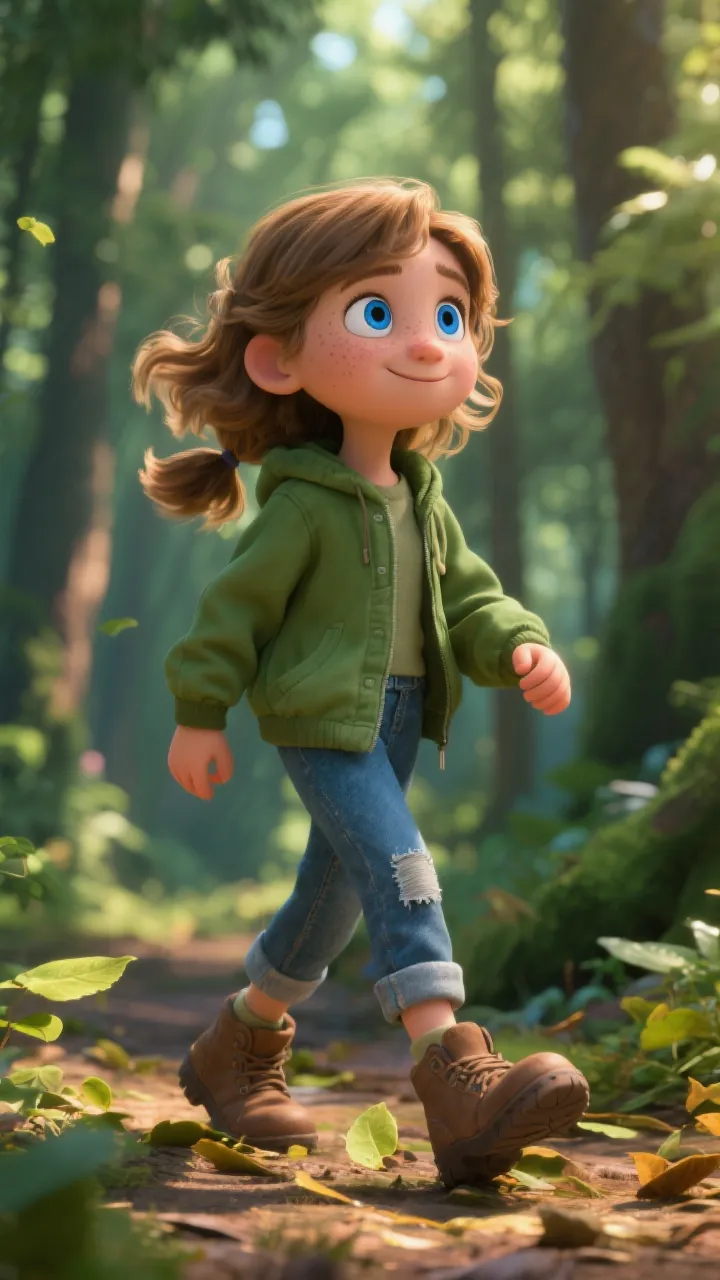
  • Disney Pixar-style 3D animation quality
  • AI-generated characters with emotional depth
  • Professional voice acting and sound design
  • Cinematic camera angles and lighting effects
Pixar-Style Animation Made Simple

Epic Cartoon Adventures

Create sprawling cartoon narratives with rich world-building and character development. Perfect for fantasy stories, adventures, and immersive storytelling that captivates audiences from start to finish.

  • Epic fantasy and adventure cartoon creation
  • Rich world-building with detailed environments
  • Complex character arcs and development
  • Seamless scene transitions and pacing
Epic Cartoon Adventures

Heartwarming Cartoon Stories

Bring emotional, character-driven stories to life with beautiful cartoon animation. Perfect for touching narratives, friendship tales, and stories that connect with viewers on a deep emotional level.
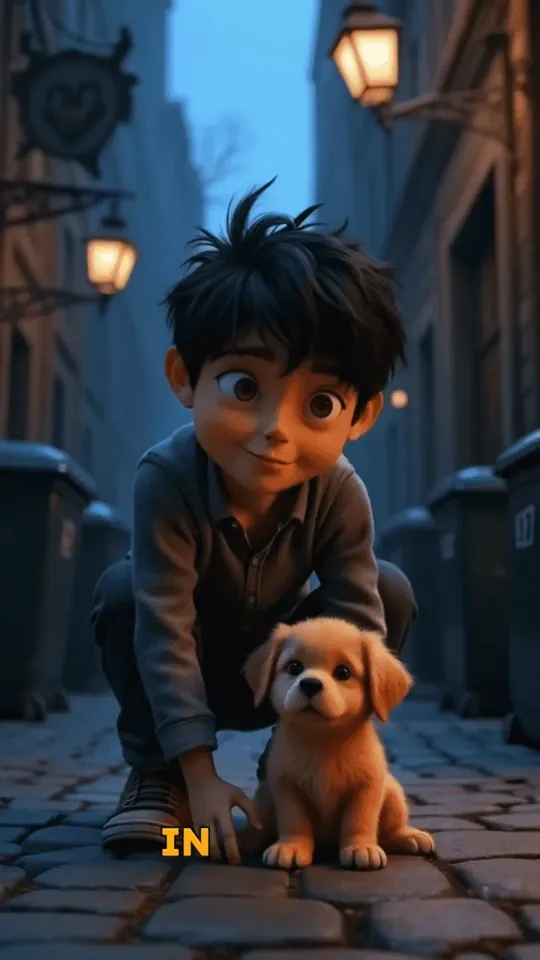
  • Emotional storytelling with cartoon characters
  • Beautiful hand-drawn animation aesthetic
  • Perfect for family-friendly content
  • Optimized for social media engagement
Heartwarming Cartoon Stories
FAQs

Frequently Asked Questions

What is the AI Cartoon Video Generator?
Revid's AI Cartoon Video Generator is an online tool that turns a prompt, script, or story idea into a complete animated cartoon video. It can generate cartoon-style visuals, natural voiceover, captions, background music, sound effects, and scene transitions automatically. It is designed for creators who want to make short cartoon videos for TikTok, YouTube Shorts, Instagram Reels, and other social platforms without filming, animating, or editing from scratch.
How do I create an AI cartoon video with Revid?
To create an AI cartoon video, enter your prompt or script, describe the characters and story, choose a visual media type, select a voice and music style, then click generate. Revid's AI Cartoon Video Generator creates the scenes, narration, captions, and audio for you. Once the video is ready, you can edit it directly inside Revid and export it for social media.
What kind of prompts work best for the AI Cartoon Video Generator?
The best prompts for an AI cartoon video generator are specific and visual. Mention the main character, setting, action, mood, animation style, target audience, and desired video length. For example, instead of writing "a dog adventure," write "a brave golden retriever explores a glowing forest at night in a colorful 3D cartoon style, with a heartwarming and funny tone." Clear prompts help Revid create better cartoon scenes and more consistent storytelling.
Can I turn a script into a cartoon video?
Yes. Revid is built for script to cartoon video creation. Paste your script into the AI Cartoon Video Generator, choose a voice and cartoon visual style, and Revid will convert the script into an animated video with scenes, captions, music, and sound effects. This is ideal for storytelling channels, educational content, motivational shorts, product explainers, and faceless video channels.
Can I make cartoon videos for TikTok, YouTube Shorts, and Instagram Reels?
Yes. The AI Cartoon Video Generator is optimized for short-form vertical content, including TikTok videos, YouTube Shorts, and Instagram Reels. The default format is vertical 9:16, which is the most common layout for mobile-first social video. You can create animated cartoon shorts, cartoon stories, AI character videos, and faceless cartoon content ready to publish.
What cartoon styles can I create with this AI cartoon video maker?
Revid can help you create a wide range of cartoon video styles, including 3D cartoon animation, colorful storybook animation, anime-inspired scenes, motion graphics, cinematic cartoon storytelling, educational cartoons, and faceless animated videos. You can guide the AI cartoon video maker by describing the exact style you want in your prompt.
Does the AI Cartoon Video Generator create voices too?
Yes. Revid can generate natural AI voiceovers for your cartoon video. Choose from available AI voices, and the tool will create narration that matches your script. The AI Cartoon Video Generator can also add captions, background music, and sound effects, so you can produce a complete animated short video without recording audio yourself.
Can I create talking cartoon characters?
Yes. If you want a cartoon character to speak, describe the character and dialogue clearly in your prompt. When using AI video generation, Revid can create character-based animated scenes with spoken audio. This makes the AI Cartoon Video Generator useful for skits, storytelling, explainer videos, mascot videos, and short cartoon scenes with dialogue.
Can I upload my own images or character references?
Yes. You can upload your own media and use it as a visual reference for your cartoon video. This is helpful if you want the AI Cartoon Video Generator to follow a specific character, mascot, brand look, product, or visual direction. Revid can use uploaded media alongside your prompt to create a more personalized animated video.
What is the difference between AI video, moving AI images, and motion graphics?
AI video generates unique animated video clips with more dynamic motion. Moving AI images create AI-generated images and add motion effects, which is great for fast cartoon storytelling. Motion graphics create clean animated graphic scenes, often useful for explainers and educational content. Revid's AI Cartoon Video Generator lets you choose the media type that best fits your video style, budget, and creative goal.
Can I use the AI Cartoon Video Generator for faceless videos?
Absolutely. Revid is a strong faceless cartoon video generator because you do not need to appear on camera, film footage, or hire animators. You can enter a prompt or script, choose a cartoon style, and generate a complete AI cartoon video with narration and visuals. This makes it useful for faceless TikTok channels, YouTube Shorts channels, educational pages, storytelling accounts, and niche content brands.
How long does it take to generate an AI cartoon video?
Most AI cartoon videos are generated in a few minutes, depending on the length of the script, the selected media type, and the complexity of the scenes. Short videos for TikTok, YouTube Shorts, and Instagram Reels are usually created quickly. Longer or more detailed animated videos may take a little more time.
Can I edit the cartoon video after it is generated?
Yes. Every AI cartoon video created with Revid can be edited after generation. You can adjust captions, replace or regenerate scenes, change music, refine the voiceover, edit timing, and polish the final output. The AI Cartoon Video Generator gives you a strong first version, and the built-in editor lets you customize it before publishing.
Can I add sound effects to my cartoon video?
Yes. Revid can generate sound effects for your cartoon video automatically. Sound effects make AI cartoon videos more engaging by adding impact to actions, transitions, emotional moments, comedy beats, and cinematic scenes. Combined with music, captions, and voiceover, sound effects help your animated short video feel more complete and professional.
Is this AI cartoon video generator good for storytelling?
Yes. The AI Cartoon Video Generator is especially useful for visual storytelling. You can create short stories, fantasy adventures, emotional character moments, comedy sketches, educational narratives, kids-style stories, and social media series. Revid can invent scenes from your prompt and structure them into a watchable animated video.
Can I create a series of cartoon videos with Revid?
Yes. Revid is useful for creating a repeatable cartoon video series. You can reuse similar prompts, characters, topics, and styles to maintain a consistent format across multiple videos. This is helpful for creators building a TikTok series, YouTube Shorts channel, Instagram Reels format, educational series, or faceless cartoon brand.
Do I need animation or video editing skills?
No. Revid's AI Cartoon Video Generator is designed for beginners and creators who want fast results. You do not need animation software, design skills, filming equipment, or editing experience. Describe the video you want, choose a few options, generate, and then make simple edits if needed.
Can I use AI cartoon videos commercially?
Yes, you can use videos created with Revid for commercial content, marketing, social media, brand storytelling, educational content, and monetized channels, as long as your use follows Revid's terms and you have the rights to any custom assets you upload. If you upload your own music, images, logos, or media, make sure you have permission to use them commercially.
How can I make my AI cartoon video look better?
To get better results from the AI Cartoon Video Generator, write a detailed prompt, specify the cartoon style, explain the main character, describe the environment, mention the mood, and keep the story focused. Short, clear scenes usually work better for social videos. You can also regenerate or edit scenes in Revid until the final cartoon video matches your vision.
What topics can I use with the AI Cartoon Video Generator?
You can use the AI Cartoon Video Generator for almost any topic, including stories, education, history, science, business, motivation, comedy, fantasy, product explainers, social media trends, podcast clips, article summaries, and fictional characters. If your idea can be described in text, Revid can help turn it into an animated cartoon video.
How much does it cost to create an AI cartoon video?
The cost depends on your Revid plan, selected video model, media type, duration, and generation settings. Some advanced AI video options may require more credits or a paid subscription. Before generating, Revid shows the required credits so you know the cost of creating your AI cartoon video.
I have another question about the AI Cartoon Video Generator. How can I get help?
If you have questions about using the AI Cartoon Video Generator or any other Revid tool, contact the Revid support team at hello@revid.ai. We can help with prompts, video generation, editing, credits, publishing, and choosing the best settings for your cartoon video.
View Complete Help Center

Find detailed answers to 100+ questions about features, tools, and workflows

or check our markdown version optimized for LLMs

Tools

Free AI Video Tools

Choose your tool, add your content, and create a video in seconds. Then customize it to your liking.

AI TikTok Video Generator

Turn text into trendy, viral TikTok videos in a snap

Try it out

Prompt to Video

Turn your prompts into engaging videos with AI assistance

Try it out

Add Caption to Video

Generate subtitles in 100+ languages with AI captions

Try it out

PDF to Brainrot

Convert PDFs into attention-grabbing, scrollable videos

Try it out

Text to Brainrot

Turn your text into trendy, scrollable content with dynamic visuals

Try it out

AI Talking Avatar

Create lifelike talking avatars from text in seconds

Try it out

Video Podcast Generator

Transform your podcasts into visually engaging video content

Try it out

AI Movie Maker

Create studio-quality videos from text, no filming required

Try it out

Audio to Video

Make engaging videos from your podcasts, interviews, or any audio content

Try it out

Animated Lyrics Video Generator

Turn any song into an animated lyric video with synced text and visuals.

Try it out

AI Music Video Generator

Transform your music into cinematic music videos.

Try it out

AI Lyrics Video Generator

Transform your lyrics into a complete music video with AI

Try it out
See all tools
How it works

Four simple steps to create and share your video

1
Step 1

Find your next viral idea

Lacking inspiration? Our AI spots trends and helps you adapt them for your own videos, hassle-free.

  • Identify the best performing formats
  • Get inspired by top creators
  • Turn your ideas into captivating videos
Find your next viral idea
2
Step 2

Storytelling designed to captivate

Revid.ai analyzes viral videos and uses those same codes to write your scripts.

  • Write your script or just give the topic to our AI
  • The AI will suggest relevant content to inspire you
  • Paste a link, our AI analyzes it and turns it into a video
Storytelling designed to captivate
3
Step 3

Videos you will love

Create professional videos, share them with one click, and grow your audience.

  • Watch your texts turn into professional videos
  • Automate video creation from your content
Videos you will love
4
Step 4

Publish on TikTok, YouTube, Instagram and more

Reach a wider audience by sharing your videos across all your networks.

Publish on TikTok, YouTube, Instagram and more
revid.ai logo

The fastest way to create captivating videos.
