Trusted by 14,000+ creators worldwide

AI Sports Highlights Generator

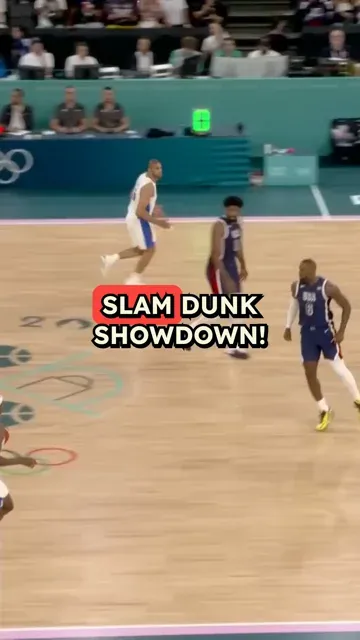
Create AI Sports Highlights in Minutes. Input your raw video and Revid AI will generate a short video with auto-generated voiceover and subtitles.

  • Upload your source media
  • AI voiceover
Video Format
1,792 people used this tool in the last 24h
Start for free.(no credit card required)

or explore our 42+ other tools to create the exact video you want

Explore our tools

Create AI Sports Highlight Videos in 4 Simple Steps

1 Upload Your Sports Footage

Start by uploading your raw match footage, training video, tournament recording, or sports clip. You can also paste a supported video link when available. Revid AI works as an AI sports highlights generator that turns silent or unedited footage into a polished highlight video ready for TikTok, YouTube Shorts, Instagram Reels, and other social platforms.

2 Trim the Video If Needed

Use the optional trim settings to choose the exact part of the footage you want to process. This is useful for long matches, full training sessions, or tournament recordings where you only want to generate sports highlights from a specific time range. You can enter start and end times in seconds, or use "end" to process until the end of the video.

3 Add Commentary Instructions

Tell the AI commentator how you want the sports highlight video to sound. You can ask for energetic sports commentary, mention a team name, focus on a specific player, highlight goals or key plays, or create a dramatic broadcast-style recap. These instructions help the AI sports commentary generator produce a voiceover that fits your footage and audience.

4 Generate, Edit, and Share

Click generate and Revid AI will create a complete sports highlights video with AI-generated voiceover commentary and synchronized subtitles. Once your video is ready, you can review it, make final edits in the built-in editor, download it, or publish it as vertical short-form content for TikTok, Instagram Reels, YouTube Shorts, and more.

01

Generate Professional Sports Highlight Videos from Raw Footage in Minutes

Upload your raw sports footage and Revid adds AI-generated voiceover commentary and synchronized subtitles automatically, transforming unedited match recordings into polished highlight videos ready to share. No manual clip selection, commentary recording, or video editing is required. The AI generates a natural sports commentary track that narrates the key moments in your footage and adds accurate captions timed to the narration. The output is a complete sports highlight video with professional presentation produced in the time it takes to upload the file.

02

What the AI Adds to Your Sports Video Automatically

The sports highlights generator layers two production elements onto your uploaded footage: an AI-generated commentary voiceover that describes and narrates the action, and synchronized subtitles formatted for social media viewing. The commentary is generated to match the tone and energy of sports broadcasting, giving your clips the professional feel of edited highlight packages without requiring a commentator or editing session. Output is formatted for the platform you are posting to, whether vertical for TikTok and Reels or widescreen for YouTube.

03

Sports Highlight Content That Reaches Athletes, Fans, and Media Audiences

Sports content performs consistently well on social media, with strong engagement for match highlights, training footage, and athlete showcase videos across TikTok, Instagram, and YouTube Shorts. Clubs, coaches, and sports organizations that share highlight content regularly build larger online followings and attract more sponsor attention than those that only maintain static social profiles. Revid makes it practical to publish polished highlight videos after every game, training session, and tournament without a dedicated video editor processing each clip.

Target Audience

Who is this tool for?

Sports teams and clubs sharing match highlights

Post polished highlight videos from every match automatically without a dedicated editor, keeping your fans, supporters, and sponsors engaged throughout the entire season.

Sports journalists and commentators

Add professional commentary to raw sports footage quickly, producing highlight packages that communicate the key moments of a match without spending hours in a video editor.

Youth sports coaches and training academies

Share athlete development highlights and training session clips as polished short videos that showcase your academy's work to prospects, parents, and recruiting organizations.

Sports brands and sponsorship teams

Create branded sports highlight content for sponsorship activations, athlete partnerships, and event campaigns that reaches sports audiences across every social platform.

Comparison

Revid vs. Manual Sports Highlight Video Production

Traditional sports highlight production requires footage review, clip selection, commentary recording, and editing. Revid generates a finished highlight video with commentary automatically from your uploaded footage.

Input
Revid AI Sports Highlights GeneratorUpload footage and generate highlights automatically
Other ToolsReview all footage, mark timestamps, and edit every clip manually
Commentary
Revid AI Sports Highlights GeneratorAI sports commentary generated and synced automatically
Other ToolsRequires hiring or recording a commentator separately
Subtitles
Revid AI Sports Highlights GeneratorCaptions generated and synced to commentary automatically
Other ToolsManual transcription and caption placement required
Editing
Revid AI Sports Highlights GeneratorFully assembled highlight video delivered automatically
Other ToolsFull editing workflow required to combine clips and audio
Production time
Revid AI Sports Highlights GeneratorFinished highlight video in minutes per match
Other ToolsHours of editing work per highlight package produced
Volume
Revid AI Sports Highlights GeneratorProcess multiple matches or sessions in one workflow
Other ToolsEach match requires a separate full production run
FAQs

Frequently Asked Questions

What is the AI Sports Highlights Generator?
The AI Sports Highlights Generator is a Revid AI tool that turns raw sports footage into polished highlight videos with automatic voiceover commentary and subtitles. Upload a match recording, training clip, or sports video, add optional commentary instructions, and the AI sports highlights generator creates a ready-to-share sports highlight video in minutes.
How does the AI sports highlights generator work?
Revid AI analyzes your uploaded sports footage, generates a sports-style voiceover commentary, adds synchronized subtitles, and formats the result as a complete highlight video. Instead of manually reviewing footage, recording commentary, transcribing captions, and editing everything together, you can use the AI sports highlights generator to automate the production workflow.
Can I create sports highlights from raw match footage?
Yes. The tool is designed to generate sports highlights from raw footage, including full match recordings, practice sessions, tournament videos, player clips, and game recaps. You can upload your video, optionally trim it to the most important section, and let Revid AI add commentary and subtitles automatically.
Does the tool automatically find the best moments in my sports video?
The AI Sports Highlights Generator is built to help transform sports footage into a polished highlight-style video with commentary and captions. For best results, you can trim your video to the section that contains the key moments you want to showcase, such as goals, saves, assists, winning plays, knockouts, finishes, or training highlights.
What sports can I use this AI sports highlight maker for?
You can use Revid AI for many types of sports content, including soccer, football, basketball, baseball, tennis, volleyball, rugby, hockey, combat sports, running, cycling, fitness, motorsports, and youth sports. The AI sports highlights generator works especially well for footage where you want to add commentary, subtitles, and a professional recap format.
Can the AI add sports commentary to my video?
Yes. Revid AI includes an AI sports commentary generator that creates a voiceover for your highlight video. You can ask the commentator to sound excited, dramatic, professional, funny, or broadcast-style. You can also tell the AI to focus on a specific athlete, player number, team name, goal, save, or key moment.
Can I give instructions to the AI commentator?
Yes. The commentary instruction box lets you guide the AI voiceover. For example, you can write: "Focus on player #10, mention the blue team, be very enthusiastic about the goals." The AI sports highlights generator will use your instructions to create more relevant sports commentary for the final video.
Does the AI Sports Highlights Generator add subtitles automatically?
Yes. Revid AI automatically adds synchronized subtitles to the sports highlights video. Captions are especially important for TikTok, Instagram Reels, and YouTube Shorts because many viewers watch videos without sound. The tool generates subtitles timed to the AI commentary so your sports content is easier to watch and more engaging.
Can I make vertical sports highlights for TikTok, Reels, and YouTube Shorts?
Yes. The AI Sports Highlights Generator is designed for short-form social video creation, including vertical sports highlights for TikTok, Instagram Reels, and YouTube Shorts. You can create mobile-friendly highlight videos with voiceover and subtitles, making your sports clips easier to share across social platforms.
Can I use this as a football or soccer highlights generator?
Absolutely. Revid AI works well as a football highlights generator and soccer highlights generator. You can upload match footage, training clips, goals, assists, goalkeeper saves, player showcases, or team recaps, then generate a sports highlight video with AI commentary and subtitles in minutes.
Can coaches and clubs use this for youth sports highlights?
Yes. Coaches, clubs, academies, and youth sports organizations can use the AI sports highlights generator to create polished videos from games and training sessions. It is useful for sharing player development clips, team updates, recruitment videos, sponsor content, and social media highlights without hiring a dedicated video editor.
Can sports journalists and creators use this tool?
Yes. Sports journalists, commentators, creators, and media teams can use Revid AI to quickly produce sports recap videos and highlight packages. The automatic voiceover and subtitles help turn raw footage into a more professional video that explains the key moments clearly for fans and viewers.
Do I need video editing experience to create sports highlights?
No. The AI Sports Highlights Generator is built for users who want to create sports highlight videos without complex editing software. You upload the footage, add optional instructions, and generate the video. Revid AI handles the commentary, subtitles, and video assembly automatically, while still giving you editing options after generation.
Can I edit the sports highlight video after it is generated?
Yes. After Revid AI generates your sports highlights video, you can open it in the built-in editor to make adjustments. You can refine captions, trim sections, change timing, adjust visuals, and polish the final video before downloading or sharing it.
How long does it take to generate a sports highlight video?
Most sports highlight videos are generated in a few minutes, depending on the length of the uploaded footage and the selected settings. Trimming long footage before generation can help speed up processing and save credits. Once complete, your AI-generated sports highlights video will be ready to review, edit, and share.
What type of footage works best with the AI sports highlights generator?
For best results, use clear sports footage where the action is visible and the main plays are easy to identify. Match recordings, sideline footage, training clips, tournament videos, and player showcase clips all work well. If your recording is very long, use the trim option to select the section with the strongest moments before generating the final sports highlight video.
Can I upload silent sports footage?
Yes. The tool is ideal for silent sports footage because Revid AI can add AI-generated sports commentary and subtitles automatically. This helps turn basic camera recordings into more engaging highlight videos with a professional presentation.
How much does it cost to use the AI Sports Highlights Generator?
The cost depends on your Revid AI plan, available credits, video length, and selected generation settings. You will see the estimated credit usage before generating your sports highlight video. Free users can start with limited credits, while paid plans provide more monthly credits for creating more AI sports highlights.
Can I use the generated sports highlight videos commercially?
Yes, you can use videos created with Revid AI for commercial and promotional purposes, including sports marketing, club social media, athlete branding, sponsorship content, and event promotion. Make sure you have the rights to use the footage, logos, music, and any other uploaded assets in your video.
Where can I share the sports highlight videos I create?
You can download and share your AI-generated sports highlights on TikTok, Instagram Reels, YouTube Shorts, YouTube, X, LinkedIn, Facebook, team websites, sponsor pages, and athlete profiles. Revid AI helps format sports highlight content for social media so it is easy to publish and repurpose across platforms.
What makes Revid AI different from editing sports highlights manually?
Manual sports highlight production usually requires watching footage, choosing clips, recording commentary, editing the video, transcribing subtitles, and exporting multiple formats. Revid AI automates the most time-consuming parts by generating sports commentary, adding synchronized subtitles, and creating a polished sports highlight video from your uploaded footage.
I have another question about creating AI sports highlights. How can I get help?
If you need help using the AI Sports Highlights Generator or any other Revid AI tool, contact our support team at hello@revid.ai. We can help with uploads, generation settings, commentary instructions, subtitles, editing, and creating better sports highlight videos for social media.
View Complete Help Center

Find detailed answers to 100+ questions about features, tools, and workflows

or check our markdown version optimized for LLMs

Tools

Free AI Video Tools

Choose your tool, add your content, and create a video in seconds. Then customize it to your liking.

AI TikTok Video Generator

Turn text into trendy, viral TikTok videos in a snap

Try it out

Prompt to Video

Turn your prompts into engaging videos with AI assistance

Try it out

Add Caption to Video

Generate subtitles in 100+ languages with AI captions

Try it out

PDF to Brainrot

Convert PDFs into attention-grabbing, scrollable videos

Try it out

Text to Brainrot

Turn your text into trendy, scrollable content with dynamic visuals

Try it out

AI Talking Avatar

Create lifelike talking avatars from text in seconds

Try it out

Video Podcast Generator

Transform your podcasts into visually engaging video content

Try it out

AI Movie Maker

Create studio-quality videos from text, no filming required

Try it out

Audio to Video

Make engaging videos from your podcasts, interviews, or any audio content

Try it out

Animated Lyrics Video Generator

Turn any song into an animated lyric video with synced text and visuals.

Try it out

AI Music Video Generator

Transform your music into cinematic music videos.

Try it out

AI Lyrics Video Generator

Transform your lyrics into a complete music video with AI

Try it out
See all tools
How it works

Four simple steps to create and share your video

1
Step 1

Find your next viral idea

Lacking inspiration? Our AI spots trends and helps you adapt them for your own videos, hassle-free.

  • Identify the best performing formats
  • Get inspired by top creators
  • Turn your ideas into captivating videos
Find your next viral idea
2
Step 2

Storytelling designed to captivate

Revid.ai analyzes viral videos and uses those same codes to write your scripts.

  • Write your script or just give the topic to our AI
  • The AI will suggest relevant content to inspire you
  • Paste a link, our AI analyzes it and turns it into a video
Storytelling designed to captivate
3
Step 3

Videos you will love

Create professional videos, share them with one click, and grow your audience.

  • Watch your texts turn into professional videos
  • Automate video creation from your content
Videos you will love
4
Step 4

Publish on TikTok, YouTube, Instagram and more

Reach a wider audience by sharing your videos across all your networks.

Publish on TikTok, YouTube, Instagram and more
revid.ai logo

The fastest way to create captivating videos.
